

Elementor Pro (eingebaut) #
Variante 1: Elementor Pro (eingebaut) #
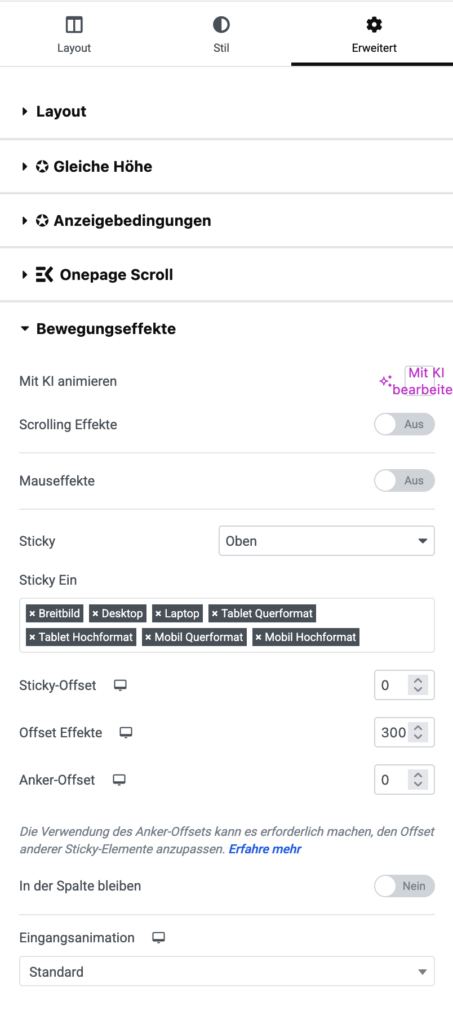
- Gehe in den Header-Template (Theme Builder).
- Wähle die Sektion mit deinem Menü aus.
- Unter Erweitert → Bewegungseffekte → Sticky → „Oben“ aktivieren.
- So bleibt das Menü beim Scrollen kleben.
- Unter Erweitert → Benutzerdefinierte CSS kannst du dann per Pseudoklasse arbeiten, oder du nutzt den globalen Body-Selector.
- Elementor fügt automatisch Klassen hinzu, z. B.
.elementor-sticky--effectssobald die Sticky-Logik aktiv wird.
- Elementor fügt automatisch Klassen hinzu, z. B.
.elementor-sticky--effects {
  background-color: #fff;
  box-shadow: 0 2px 10px rgba(0,0,0,0.1);
}
Optionale CSS:
/* ===== Basiszustand: bleibt unverändert ===== */
.elementor-location-header {
background: transparent;
transition: background .3s ease, box-shadow .3s ease, transform .3s ease;
}
.elementor-location-header .elementor-container {
transition: min-height .3s ease, padding .3s ease;
}
/* Sticky-Zustand: halbtransparent & kompakt / .elementor-sticky–active.elementor-sticky–effects { background: rgba(255, 255, 255, 0.9) !important; / halbtransparent weiß */
backdrop-filter: blur(8px) saturate(120%);
-webkit-backdrop-filter: blur(8px) saturate(120%);
box-shadow: 0 8px 24px rgba(0, 0, 0, 0.08);
}
.elementor-sticky–active.elementor-sticky–effects .elementor-container {
min-height: 65px !important;
/* nur im Sticky-Zustand */
padding-top: 0px !important;
padding-bottom: 0px !important;
}
/* Logo verkleinern nur beim Scrollen */
.elementor-sticky–effects.elementor-sticky–effects .elementor-widget-image img,
.elementor-sticky–effects.elementor-sticky–effects .site-logo img {
height: 100px;
transition: height .3s ease, margin-bottom .3s ease;
/* passend zur Sticky-Höhe */
margin-bottom: -10px;
}
/* Menüpunkte im Sticky-Zustand schwarz */
.elementor-sticky–effects.elementor-sticky–effects .elementor-nav-menu–main .elementor-item,
.elementor-sticky–effects.elementor-sticky–effects .elementor-nav-menu .elementor-item {
color: #000 !important;
font-size: 18px !important;
}
/* Hamburger/Toggle im Sticky-Zustand schwarz */
.elementor-sticky–effects.elementor-sticky–effects .elementor-menu-toggle {
color: #000 !important;
border-color: #000 !important;
}
Bei Backmann & Domröse: #
/* ONSCROLL MENU */
header.elementor-sticky–effects{
background: rgba(255,255,255,0.9) !important;
}
header.elementor-sticky–effects img {
height: 40px;
}
header.elementor-sticky–effects .elementor-element.elementor-element-21cfe8c.e-con-full.e-flex.e-con.e-child {
padding-top:0px !important;
padding-bottom:0px !important;
}
/* END ONSCROLL MENU */